

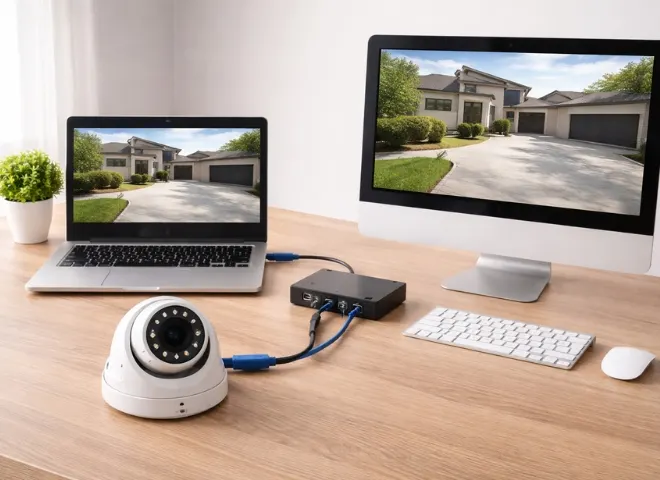
Los Angeles is a city of 3.8 million people, local and tourist both live here for business. This city is well-known because of its film industry and urban landscapes. That is why it attracts all the businessmen to make their presence here. But they need proper security to keep their home, business and other properties safe and secure. For such reasons, the residents of Los Angeles adopt modern technology to get complete control over their home and asset security. In recent times, connecting a security IP camera to a PC or Mac is highly in demand due to its features like real-time monitoring, better storage management, recorded footage access, and chat through the camera between the employees and the company owner. In this blog, we will see how the FDS security cameras connect a security IP camera to a PC and Mac for seamless viewing and control.
Understanding IP Camera Connectivity Basics
It is very important to know how IP cameras work, what the requirements are to connect your security IP camera to your PC and Mac. Because these cameras work differently compared to the traditional CCTV system, it transmits data through a proper network. And the key requirements are listed below.
Key requirements:
- It requires the availability of the internet or a local network connection,
- The IP camera’s assigned IP address
- It needs compatible software or browser support like Google Chrome, Bing, Safari and Firefox.
Both Wired and Wi-Fi connections are ideal for the IP cameras’ connection; this feature provides flexibility for the users.
How to Connect an IP Camera to a Windows PC
After understanding the basics of IP camera connectivity, now we will let you know how you will connect your IP camera to a Windows PC. For this purpose, you have to follow our key guidance steps.
Essential Step For PC Setup
- see if your internet connection is working well, then connect your IP camera with your router via wifi.
- Use a web browser of Google Chrome or Safari, or you can also download and install the camera’s official software.
- To obtain the right camera IP address use the IP scanner tool.
- Enter the IP adress into your browser.
- Use the camera credentials for login.
- Now you can configure the recording settings, live view and storage preference.
Note: Change the default password to make it more secure.
How to Connect an IP Camera to a Mac
With the right tool, the MAC users can also access the IP cameras. Let’s see what the major steps are for connecting an IP camera to a Mac.
Some of The Basic Steps for Mac Setup:
- Make sure the camera and Mac are both connected to the proper network.
- Use any browser to access the camera’s IP address.
- Install any required plugins or use compatible surveillance software like VLC or manufacturer apps.
- Log in and configure settings such as live streaming and motion detection.
Some advanced users additionally use third-party apps to see multiple cameras at once. This is especially helpful for businesses that use Security Cameras systems.
Common Connection problems troubleshooting
When a user connects their IP cameras to a PC or a Mac, they face some issues. Here, we will give you some assistance to fix the issues.
Camera not detected: Check network connection and IP address
Login issues: Reset credentials or camera settings
No video feed: sometimes the video feeding is not working, then you need to update the browser, plugins, or camera firmware
Slow performance: Bad networking makes the performance slow. Strong wifi signals, and perfect wired connection enhance the results.
Proper installation means you are looking for reliable and stress-free performance. We recommend that every home and business owner contact FDS security cameras for high standards setup.
Final Words
For actual control, reliability, and flexibility, it is possible when you connect a security IP camera to your PC or Mac. When you see the live streaming on your PC or Mac screen, you will understand what is happening at your home, warehouse, shops and offices. The technique is easy and works quite well with the appropriate setup and help. For safe, secure and smart surveillance system contact FDS Security Cameras.
FAQs
Question: Attaching an IP camera to a mac or PC requires what procedures?
Answer: You can link an IP camera only if your browser, IP address are correct, and internet connection is strong.
Question: how to connect a PC with an IP camera?
Answer: Link the camera to the router. Then log in with the browser’s credentials to view the official camera software or use a browser to search for the IP address using an IP scanner.
Question: Can a Mac interface with an IP camera?
Answer: Yes, you simply need to connect your camera and Mac to the same network. Access the camera’s IP via a browser and control the camera with the VLC media player.
Question: Why does my Mac or PC not show my IP camera working?
Answer: Check the incorrect IP address, outdated browser, login details issues, weak network, or plugins.
Question: What are the key advantages of linking an IP camera to a PC?
Answer: It enables you to see the Real-time monitoring, better control over storage, and the ability to talk through cameras.