

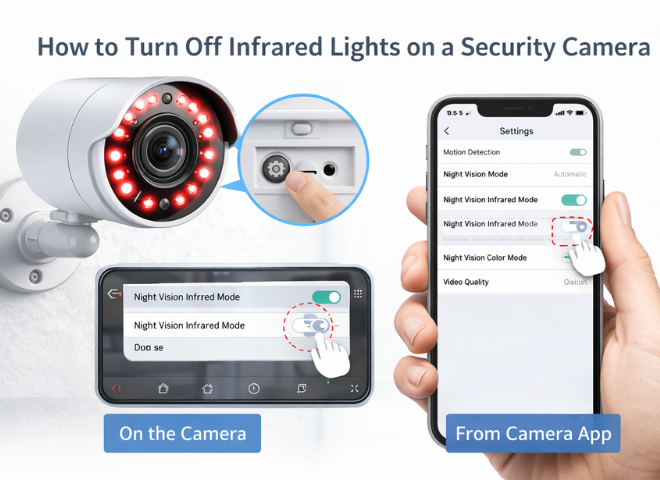
The modern security cameras are enhanced in a way to provide proper surveillance 24/7. It is only possible due to the advanced infrared (IR) night vision feature. In some situations, we turn off the IR light, such as to reduce visibility, for image quality improvements, and to avoid the reflection. In this special article, we will try to understand how to turn off infrared lights on a security camera and what the methods and tips are to do so.
What Are Infrared Lights on Security Cameras?
Infrared feature is almost available in all modern cameras. It is useful during the night. When it’s dark after the evening, this IR mode switches on automatically to produce black and white images.Infrared lights are small tiny LED lights around the camera lens. That releases unseeable light to make everything visible for the recording and taking images.
Why to Turn Off The Infrared Lights?
There are some of the very common reasons everyone needs to understand before diving into how and why turning off the infrared light is important.
For ideal results, do not ever place the IR camera behind the glass or any reflective surface, because its light reflection can wash out all the footage and can give a blurry image. So make sure to prevent your infrared lights from reflecting and glaring. These IRs are barely visible because they are absolutely subtle, but sometimes their small, red glowing light catches their attention. So it is ideal to turn it off to make the IR less noticeable.
The IR is also turned off for better image quality with external lighting. When there is enough light in the streets or at the property, then using IR mode is totally unnecessary, and it can also degrade your image quality.
How to Turn Off Infrared Lights
We will discuss the common approaches of turning off the infrared lights on the security camera because the exact method of a specific camera IR depends on its setting mode. And all the sittings are not the same.
First Method: all the modern cameras are connected with the smart phone and laptop or desktop via camera app or software. Simply just open the camera app, open the setting, check all the options in it like night vision, infrared mode and IR LEDs and toggle the setting from on to off.
Second Method: Some cameras you will not find any IR option, but allow you only control the day and night modes. So access the camera sitting first, find the mode of Day and night, and disable the infrared lights and select the day mode.
Third Method: In relatively old cameras the user has to find the physical controls like its hardware switch or button. In the manual physical control IR, check the camera hardware for a night vision toggle.
Forth Method: cover the LEDs of Infrared in a situation when there is no option of disabling IR. For such purposes use an opaque tape, and cover all the lens with precision, making sure the tap does not block the camera lens. When you need to use IR again, simply remove the tap.
Fifth Method: Use the external lighting instead of the IR. The ideal light to use instead of the IR is to install the motion detection sensor light, use the ambient outdoor lighting and add low-light floodlights. All these lights enhance the visibility for recording and taking images.
Important Considerations
- When you turn off the Infrared system, your camera’s night vision will be disabled, unless you provide another light source.
- Your camera will record everything with a colourful image during the night, if your camera is off and still the lighting is sufficient in the area.
- In budget models, the feature of turning off the IR is unavailable. So you have to stick something on the LEDs.
Best Tips for Better Results Of IR Security Cameras
- Avoid placing cameras directly behind glass unless IR is disabled.
- Glare and reflection affect the IR of security cameras.
- Consider cameras with advanced features such as smart IR, colour night vision and low-light sensor.
- Always test your camera at night after making changes.
Recommended Alternatives to Infrared Night Vision
If you don’t want to rely on IR, consider these options, such as colour night vision cameras, starlight sensors, and external IR Illuminators
- Use ambient light for clearer images, for such purposes to install color night vision cameras.
- Install Starlight Sensors camera if you need a good and ideal results in the low lights
- The external IR Illuminator installed two to three feet away from the camera. It releases the unseen lights and makes the things visible during the dark.
Diagnosing Of Some of the Common Issues
- When a camera shows IR glow then you need to check the auto mode, if it is enabled and disable it or restart the camera after changing the settings.
- When you turn off the IR and are still unable to record the image, then add some external lighting and increase the brightness or exposure in the sittings.
- Disable the IR when the footage is not clear and blur through the glass. Just clean the glass well for good footage.
Summary
In certain situations like when there is reflection, or external light is enough to see the things, the security camera IR must be off to get better results. Turn off the IR method depands on the devices, in some devices can be operated through the app, in some cameras you can change the day and night mode. In some bugdet cameras you have to cover the LED lights with the tap to get better results. Make sure to install all the cameras via a professional team like FdS security camera. They understand where to install cameras, how to do the proper wiring and how to cover all the important angles.
FAQs
Question: Can all the security cameras turn off infrared lights themselves when it gets dark?
Answer: No, some entry-level models don’t offer this option. But in modern advanced cameras, this feature is available.
Question: Will turning off Infrared improve the video quality?
Answer: Yes, when the light quality is good then the infrared light must be turned off.