

The installation of modern security camera systems is one of the most efficient ways to secure your homes, businesses, and other properties in Los Angeles. However, the selection of a suitable camera depends on your own choice and budget. An adequate storage facility for surveillance footage is also an issue for some customers. Because choosing between cloud storage and local storage needs proper research. Though both options are quite reliable, they function differently according to the security issues of your location. If you are considering mounting some CCTV cameras at home, office, store, warehouse, or apartment block, it is recommended to familiarize yourself with these storage types before investing in them. This blog will help you understand what type of storage is important for security cameras: cloud storage or local storage.
What Is Cloud Storage for Security Cameras?
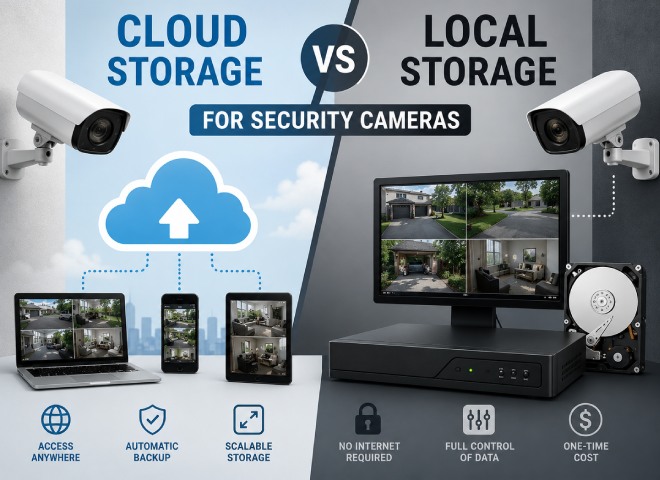
Cloud storage is an up-to-date method of saving surveillance footage to safe online servers instead of using physical devices. Your cameras upload encrypted videos over the net securely, and videos can be accessed from anywhere with the help of a computer, phone, or tablet. This technology also offers added protection for your videos against theft or loss because they are kept in a remote place from safety to backing up your videos automatically.
How Cloud Storage Works
Cloud data storage is a new method of recording and monitoring surveillance videos that uses secure online servers instead of using different equipment or tools. Your cameras encrypt all video data before being sent online to one of the ultra-secure data centers. Cloud storage is widely used nowadays due to the flexibility and remote access features in all of Los Angeles.
Benefits of Cloud Storage
The biggest benefits of using Cloud storage are the possibility of remote access and protection of the video files. Whether you are at work, on vacation, or looking after lots of other properties, you have an opportunity to monitor your video cameras in just a few minutes. The cloud storage protects your data in case the recording device is stolen or broken. Besides, the huge benefit of cloud storage is automatic saving of the files. Moreover, due to the cloud storage system, it is possible to make it grow as your surveillance needs grow.
What Is Local Storage for Security Cameras?
Local storage records surveillance footage directly onto physical equipment installed at your property. In most cases, video surveillance systems rely on the Network Video Recording (NVR) or Digital Video Recording (DVR) technology to record the footage. These recording techniques are popular due to their reliability and the ability to retain full control of your security recordings without any recurring costs of cloud storage. It has been trusted for decades because it provides complete control over your security data while eliminating the cloud storage subscription fees.
How Local Storage Works
The main difference with local storage as opposed to the cloud method is that video recordings are sent directly to an NVR or DVR that is located at the site of the recording. The recorder records the footage until the hard drive has filled, at which time old recordings will be deleted unless saved. Local systems can make use of a secure internet connection, which gives the owner the ability to check in on the camera recordings remotely.
Advantages of Local Storage
The major benefit of local storage methods is the money saved over time and no ongoing costs associated with CCTV footage storage. Local storage provides consistent recording because the cameras are still able to record even if the internet access is cut off. This is a big plus for those organizations requiring constant surveillance. Another advantage is the complete ownership of the data. The recordings are always yours, and this means that you have complete control over when and where it is stored.
Cloud Storage vs. Local Storage
| Feature | Cloud Storage | Local Storage |
| Storage Location | Stored on secure remote servers | Stored on NVR, DVR, or hard drives on-site |
| Remote Access | Easy access from anywhere | Available with network setup |
| Internet Dependency | Requires internet for uploading footage | Records even during internet outages |
| Cost | monthly subscription fees | Higher upfront cost |
| Data Protection | Protected even the equipment are stolen | Requires physical protection |
| Maintenance | Automatic updates | Requires hardware maintenance |
| Storage Expansion | increased through cloud plans | additional storage hardware |
Which Storage Option Is Better for Homes?
Both the local storage and cloud storage options are ideal for home security in Los Angeles. All the video recordings are sent directly to an NVR or DVR to keep all the data secure. The recorder records the footage until the hard drive has filled. So save the date somewhere else or otherwise all the old recordings will be deleted automatically. To see the recorded videos or live footage when you are far from home, a secure and strong internet connection helps the users and home owners to check everything
Why Choose FDS Security Cameras?
- We do professional camera installation for homeowners and commercial premises across Los Angeles.
- Our professional team customized the CCTV camera installations suitable to the size and angles of your homes.
- We expert install various kinds of video camera monitoring systems, including the cloud, local, and hybrid ones.
- The FDS Security Cameras team do Installation of high-quality cameras to provide clear images and good and reliable performance.
- The video camera systems can be linked to such systems as remote access and mobility monitoring.
- Our CCTV cameras installation system is scalable to meet the future security needs of the user’s home or business.
- The service for maintaining and upgrading systems is provided to ensure the long-term use of the equipment.
Final Thoughts
The decision-making process in the discussion of cloud vs local storage for security camera systems relies on every single user’s expectations. When convenience and continuous backup alongside security against possible equipment theft are important considerations, cloud storage becomes the best option. On the other hand, if the emphasis is put on controlling the captured information, seamless recording without disruption from the internet, and low overall expenses, local storage becomes more efficient. The ideal solution for many property owners is hybrid storage which benefits from both local recording stability and the comfort and safety of cloud storage. Once again, if making a decision, take into account the main specifications such as budget, the amount of cameras, internet reliability, recording retention period, perspectives and the FDS Security Cameras skills.